A practical guide to WebMCP, how it differs from MCP and browser automation, and what we learned connecting Chat Thing to page-declared tools.
What is WebMCP? Why it matters for websites and AI agents
AI agents can already use websites. The trouble is that most of them do it like a person wearing oven gloves: read the screen, guess which button matters, click it, wait, then inspect everything again to see if it worked.
WebMCP gives the website a way to help.
WebMCP is a proposed browser API for exposing parts of a website as structured tools for AI agents. A site can declare named tools such as search-products, update-chart or add-to-basket. Each tool explains what it does, what information it needs and what should happen when an agent calls it.
Most websites currently offer two main surfaces: a visual interface for people and APIs for other software. Agents sit awkwardly between them. They can inspect and operate the interface like a person, but they are more dependable when given structured actions like software. WebMCP proposes that missing agent-facing surface inside the browser.
The user still sees and controls the website. The agent gets a clearer route through it.
We have been testing this through Chat Thing, our AI agent platform. A small bridge let the same embedded agent use page-declared tools across six very different demos without learning the shape of each interface. It did not take a huge amount of work to implement, which is a big part of why we are excited about it.
It is also early. The specification is still being worked on, browser support is experimental and some details will change. So what is useful today, and what should product teams do with it?
What WebMCP is
A compatible AI agent can discover the tools declared by the current page and call them inside the browser. Four details matter:
- The website chooses the tools. An agent does not automatically get access to every button, form or API.
- The tools are structured. A tool has a name, a description and a schema defining the information it accepts.
- It runs in the browser. The tool can use the page's current state, interface and existing JavaScript.
- The agent can be part of the browser, an extension or embedded in the page. An embedded website copilot is part of the intended model.
Imagine an analytics product. A user asks, “Show me 404 errors grouped by page.”
Without a structured tool, an agent might need to find the status filter, open it, choose 404, find the grouping control, select page, change the chart and inspect the result.
With WebMCP, the site could expose an update-chart tool. The agent discovers that tool from the page and sends something like:
{
  "status": 404,
  "groupBy": "page",
  "chart": "bar"
}
The website validates the input and handles the change using its own code. The same controls and chart update in front of the user, who can inspect or correct the result. The agent receives the tool outcome without reverse-engineering the interface first.
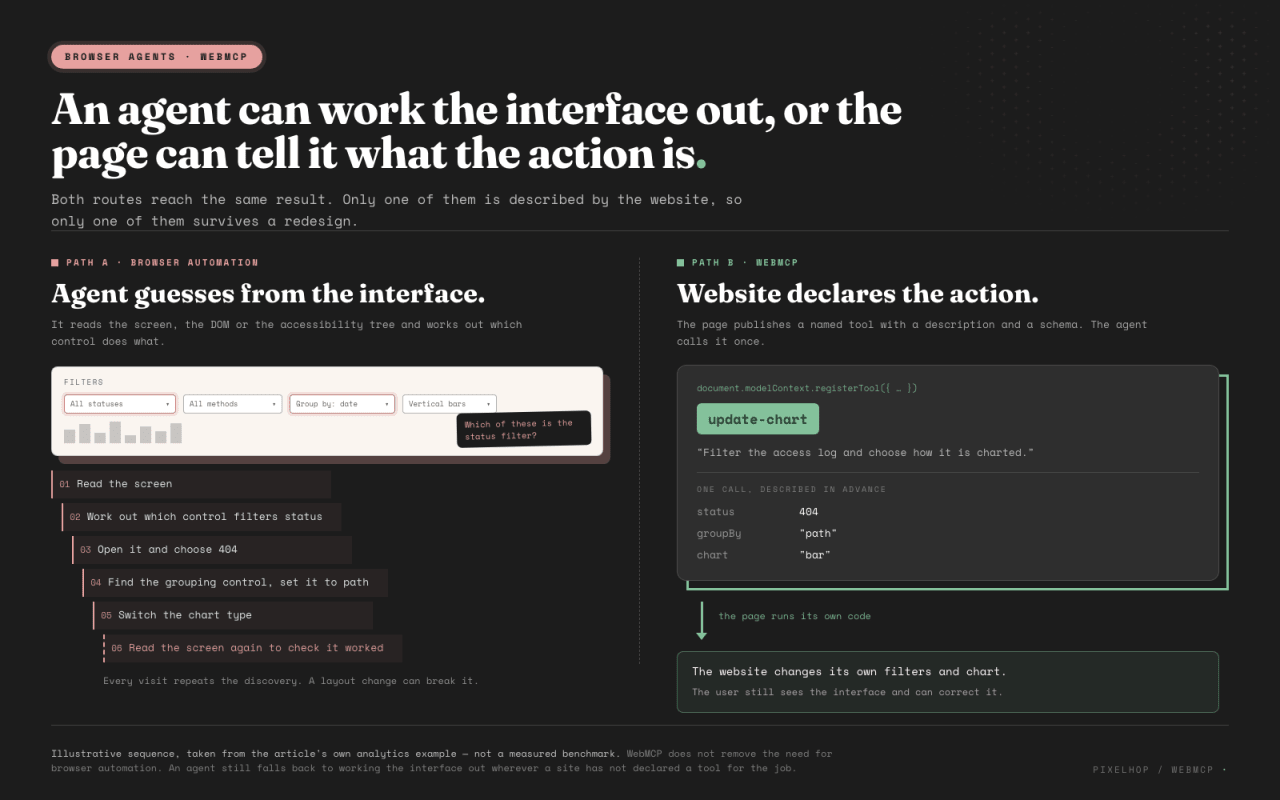
Browser automation infers controls from the interface. WebMCP lets the website declare a structured action the agent can call in the active page.
Why WebMCP is suddenly getting attention
Several things have landed close together.
Chrome opened an early preview in February 2026. The current implementation tracker lists ChatGPT Desktop support, Chrome and Edge origin trials, and experimental support in Brave's Leo assistant.
Then, on 25 August, OpenAI opened a ten-day WebMCP Challenge. Google Chrome, Shopify, Cloudflare, Netlify, Vercel and Render are among the supporters. OpenAI's example apps include 3D modelling, collaborative writing, travel planning and browser-based data exploration.
Search interest has moved with it. DataForSEO's Google Ads data estimates an average of 14,800 global monthly searches for webmcp. Searches jumped from hundreds a month in late 2025 to 74,000 in February 2026, then settled at 12,100 in July.
WebMCP is unfinished, so the current APIs still need to be treated carefully. But it has moved beyond a speculative browser proposal. Browser vendors, AI platforms and web infrastructure companies are now building and testing around the same idea.
WebMCP, ordinary MCP and browser automation
The similar names hide a fairly big architectural difference.
The Model Context Protocol normally connects an AI client to a separate MCP server. That server wraps APIs, databases or other services as tools. A user or administrator connects it to the AI client, usually with its own authentication, and the client can call those tools without opening the service's website.
WebMCP puts the tools in the website. A compatible agent discovers them when it visits the page and calls them inside the current browser context.
| Question |
Ordinary MCP server |
WebMCP |
| Where do the tools live? |
On a remote server or local MCP process |
In the live webpage |
| How does the agent find them? |
The server is installed, configured or connected to the AI client |
The agent discovers them from the page it is visiting |
| What context does it naturally have? |
Backend data, APIs and service-level state |
The current page, its UI state and the signed-in browser session |
| Does the website need to be open? |
Usually not |
Yes |
| What does the user see? |
The result may only appear in chat |
The normal website can update in front of the user |
| What is it best suited to? |
Remote, batch, recurring and cross-service work |
Contextual actions inside an interactive product |
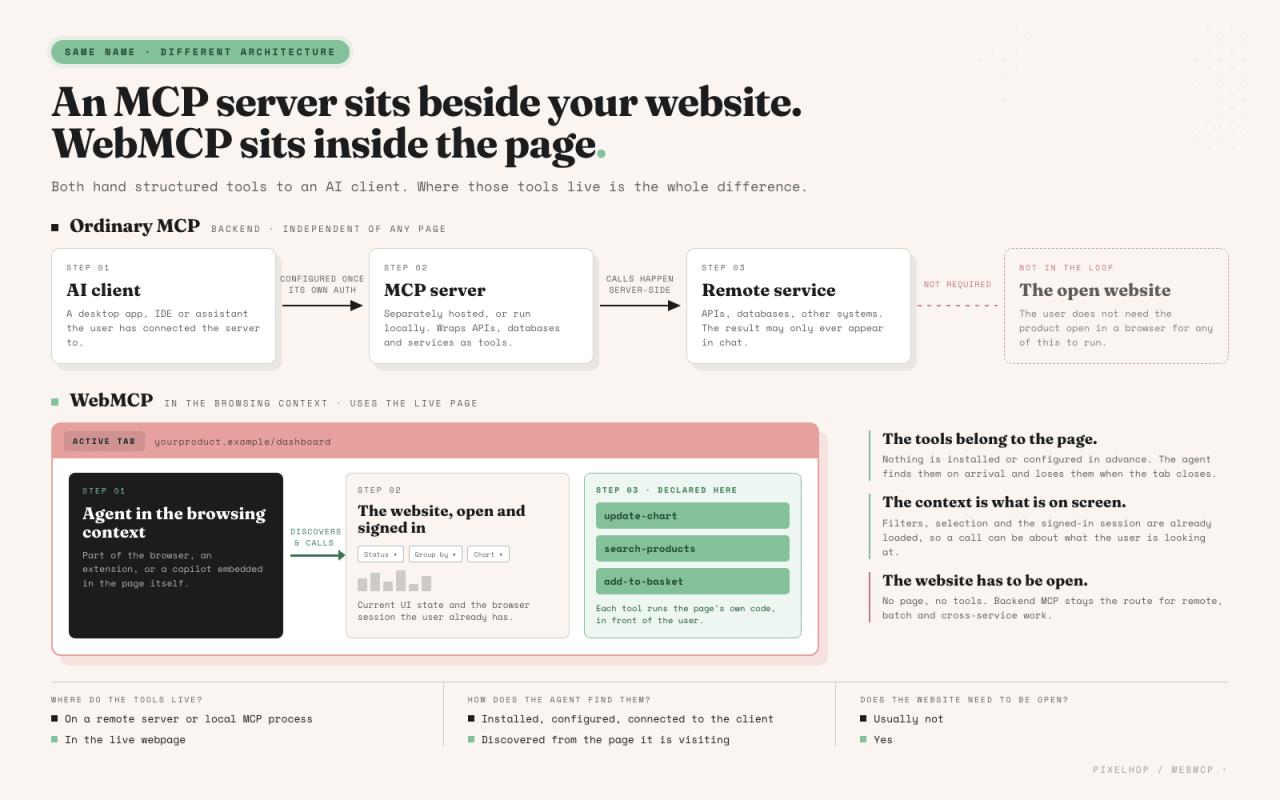
An MCP server exposes remote service tools to an AI client. WebMCP exposes tools from the website open in the user's browser.
Take an analytics platform as an example. A normal MCP server could run a report overnight, export thousands of rows and send the result somewhere else. WebMCP could help a person looking at a dashboard change the current filters and chart while they watch.
Authentication is different too. A backend MCP integration often needs its own OAuth flow or credentials. WebMCP can work with the session the user already has in the browser and the state loaded on the page. That is convenient, but the website still owns permissions, validation and confirmation around sensitive actions.
A useful decision rule is:
- use browser automation when the website has not exposed the action and the agent must operate the existing interface;
- use ordinary MCP for remote, recurring, batch or cross-service work that does not need the website open;
- use WebMCP when the person is in the page and should see or correct the result.
A mature agent may combine all three.
What the code looks like
The basic registration shape shows how bounded the integration can be. Here is a small example for a shopping site:
await document.modelContext.registerTool({
  name: "filter-products",
  description: "Show products that match a category",
  inputSchema: {
    type: "object",
    properties: {
      category: { type: "string" }
    },
    required: ["category"]
  },
  execute({ category }) {
    showProductsInCategory(category)
  }
})
The tool has four parts:
name gives the agent a stable way to identify the action.description explains when the action is useful.inputSchema says that the tool expects a category written as text.execute calls the website's existing function and updates the page.
The agent gets one bounded action rather than control over the whole application.
The WebMCP group is also exploring a declarative route for ordinary HTML forms. In its current proposed shape, a search form could look roughly like this:
<form
  toolname="search-products"
  tooldescription="Search the product catalogue">
  <input name="query" required>
  <button type="submit">Search</button>
</form>
The browser could turn that form into a tool without the site writing a separate JavaScript schema. It is another simple route to the same outcome. This part of the proposal is less settled, including how form schemas and responses should work, so treat it as a direction rather than production guidance.
Both approaches describe a useful action in a predictable format, connect it to code the site already trusts and let compatible agents discover it.
Bounded, visible and correctable
Choose which user goals deserve to become tools before thinking about registration code.
A useful WebMCP surface might help someone:
- find products that meet a set of constraints;
- build or change a report;
- configure an item;
- bring the right dashboard controls together;
- retrieve an order and start a repeat purchase;
- prepare a booking for review.
“Open the blue dropdown” is an interface instruction, not a user goal.
A good tool should be bounded, visible and correctable. The site might let an agent make a low-risk change such as filtering a catalogue, prepare something consequential for review such as a booking, or commit a sensitive action such as submitting a payment. Those are different permission and confirmation boundaries.
The website still owns input validation, permissions, confirmation policy, logging and fallback. WebMCP gives the agent a structured route into application logic; it does not supply those safeguards automatically.
The human interface matters too. A user should be able to see the result, understand what changed and correct it. The point is cooperation between the user, agent and page, not hiding the website behind a chat box.
What happened when we added it to Chat Thing
The integration did not take a huge amount of work.
Chat Thing already has a JavaScript SDK and a client-side tool system called power-ups. We added a small, opt-in bridge that reads the WebMCP tools exposed by the host page, makes them available to the Chat Thing agent and sends a chosen call back to the page.
The rest of the product did not need to know where the tool came from. Existing widgets still work as before. Browsers without WebMCP still get a normal Chat Thing agent. The bridge only switches on when the site and Chat Thing channel both allow it.
Once the bridge was in place, it worked across all six synthetic Google Chrome Labs WebMCP demos. That was the exciting bit. We did not build a separate agent interface for each demo or teach the agent the shape of six different websites.
The Server Logs demo makes this concrete. The user asked, “Chart 404 responses by path.” The embedded agent found the page's query tool, called it with the requested filters and grouping, and the dashboard updated in front of the user.
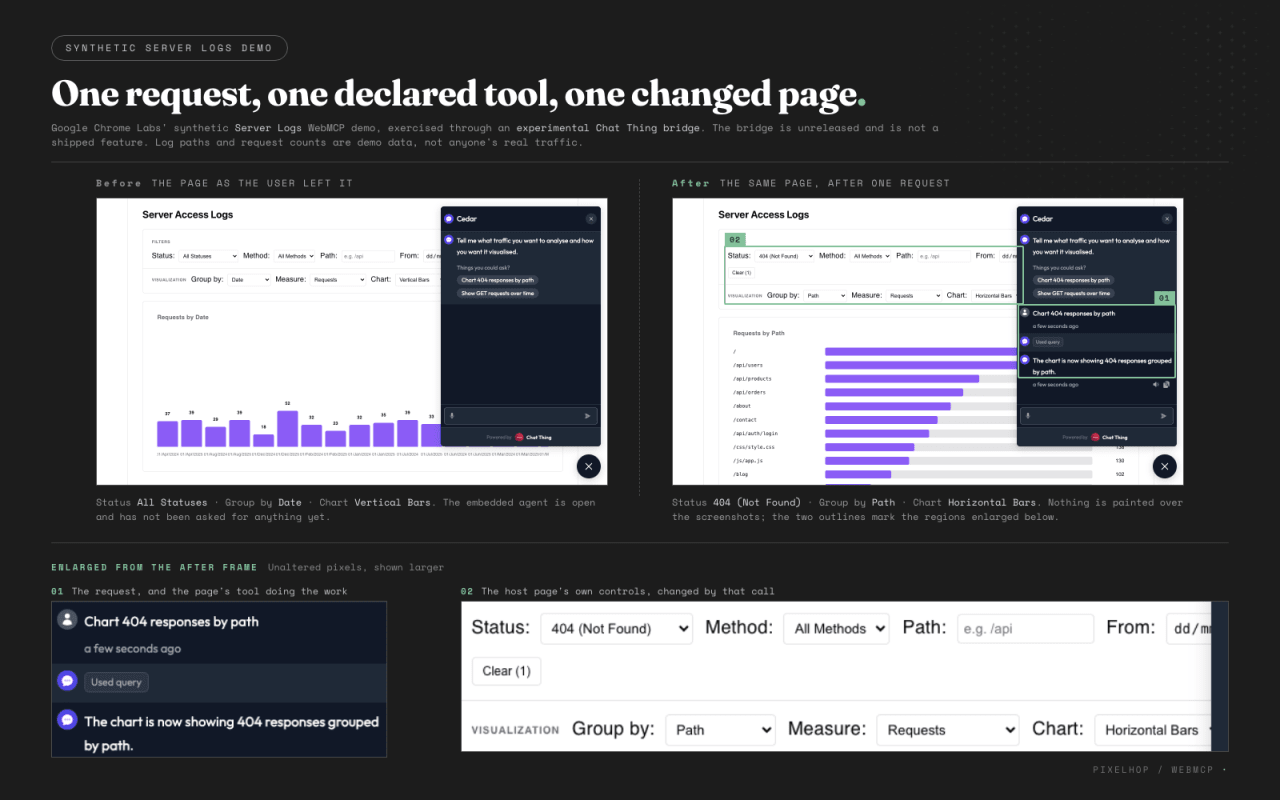
A synthetic Server Logs demo before and after an embedded Chat Thing agent used the page's WebMCP query tool to chart 404 responses by path. The bridge is experimental and unreleased.
The other journeys showed the same bridge working across very different interfaces:
- reordering a previous coffee order;
- filtering a cinema catalogue;
- rearranging a smart-home page around the controls the user needed;
- configuring a pizza through several tools;
- starting a maze, inspecting the surroundings and making a valid move.
All six changed the visible page. The shared contract was reusable even when the interface changed from commerce to analytics to an interactive game.
There were a few compatibility details to fix in our SDK, particularly around which JSON Schema features we can carry safely. Those are our implementation details. The broader integration remained small, opt-in and backwards-compatible.
Our bridge is still experimental and has not been released as a production drop-in feature. But the test changed our view of the opportunity. Adding an agent to a WebMCP-enabled site may be much easier than building a bespoke copilot for every product.
Can you use WebMCP today?
Yes, for experiments. The entry point is better than native browser-support tables make it look.
The project's current implementation status lists early support across several agent and browser surfaces, including ChatGPT Desktop, Chrome and Edge origin trials, and experimental Brave Leo support. Firefox and Safari have standards discussions rather than listed implementations. Claude is not listed as supporting WebMCP.
Google Chrome Labs also publishes a WebMCP polyfill. It recreates the page-side API in browsers that do not support WebMCP natively, including tool registration, tool execution and the proposed form-based route. The public demos use it as a fallback, and it worked in our testing.
The polyfill gives the page a WebMCP-shaped tool layer. It does not add an AI agent by itself. You still need a compatible browser agent, extension or embedded copilot such as the Chat Thing bridge we tested.
That makes it useful for developing and testing now, while keeping the native path ready as browser support improves. These support details will date quickly, so check the implementation page before planning around a particular browser.
A good first WebMCP prototype
Start with three recurring user goals, then choose one action that is useful, low-risk and easy for the user to inspect or reverse. Write down:
- the tool's name and plain-English description;
- the inputs it accepts and the visible result it should produce;
- which existing application function it should call;
- whether it can run directly or needs confirmation;
- what the agent and user should see when it succeeds or fails.
Then test the complete journey. Check that the right task finishes, the page reflects the outcome, invalid inputs are rejected, consequential actions require confirmation, failures are logged and the normal website still works when WebMCP is unavailable.
That is enough to learn whether WebMCP solves a real interaction problem without betting the whole product on an early browser API.
We think WebMCP is going to be big
WebMCP is still experimental, but our view is clear. We think it is going to take off and become a big part of how agents use the web.
It gives product teams a way to define the useful actions their websites support, the information those actions need and the application code that should run. The agent gets a dependable route through the product while the user can still see and correct the result.
Google Chrome, Microsoft Edge, OpenAI and Brave are implementing or experimenting with it. Cloudflare, Shopify, Vercel, Netlify and Render are supporting the growing ecosystem around it. Browser support is limited today, but we expect it to improve quickly.
The exact API will keep moving. The product idea should survive those changes: websites need a clear, structured way to expose useful actions to agents in the context of the page a person is already using.
The best implementations will identify the jobs where an agent can remove fiddly interaction, declare those actions carefully and keep the result visible. They will leave the rest of the product alone rather than expose every internal operation or replace the whole interface with chat.
If you are exploring how agents should use an existing website, start by writing down one bounded action and the visible result it should produce. Pixelhop can help map the right tool surface, prototype it and test the real journeys around it. We are also testing how the same approach can turn a Chat Thing widget from something that answers questions about a website into a copilot that can use the website it lives on.

